 Filedini
· 8 min read
Filedini 0.5.575 (Beta) Released
Introducing Scripting and Enhanced DDS Support driven by user feedback.

Announcing Filedini v0.5: User-Driven Features and Performance Overhaul
Thank you for using Filedini. Today, we are excited to release v0.5.575, the first version in the 0.5 series.
Since the final v0.4 release about a month ago, our development team has gone back to basics, asking “What should Filedini be?” The answer was clear: we needed to focus heavily on requests received from our users.
This update is a direct reflection of that feedback, bringing highly requested new features and significant performance improvements. Here are the highlights:
🚀 New Feature: Scripting Support
We have implemented a scripting feature—one of our most requested additions. This allows users to extend and automate Filedini’s behavior to perfectly suit their own workflows.
We hope you will experience the convenience and potential of this feature through the included samples. We are committed to continuously expanding the Script API. If you have specific needs, such as “I want this specific API” or “I want to automate this operation,” please let us know.
🖼 Enhanced Image Preview
We have thoroughly overhauled performance and compatibility for image viewing to meet the demands of professional environments.
1. Improved Memory Efficiency
We have reduced memory consumption during decoding for all supported image formats to 1/2 to 1/3 on average compared to previous versions. This ensures significantly more stable operation, even when handling large numbers of images or high-resolution files.
2. Enhanced Compatibility and Speed for DDS Formats
We have revamped the decoding engine for DDS formats, which are frequently used in game development.
Comprehensive Format Support We now support formats that were previously unreadable, covering almost all major formats currently used in the industry. (If you find an image that cannot be displayed, please report it to us.)
Significant Performance Boost The processing pipeline has been redesigned to efficiently utilize multi-core CPUs. We have confirmed speed increases of up to 17x when decoding large BC6H and BC7 formats, which are mainstream in the current generation.
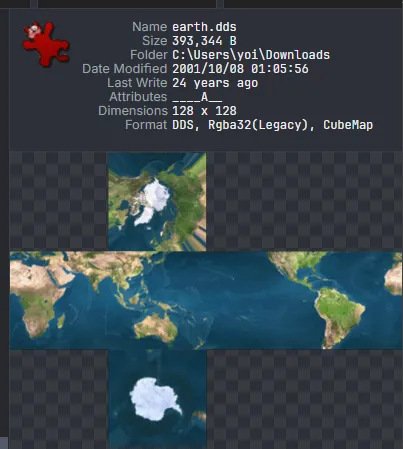
Cube Map Cross Layout Display Cube map images are now displayed in an unfolded cross layout. This allows you to check the contents of each face intuitively at a glance.
📦 Expanded Archive Format Support
In addition to the standard zip format, we have added support for the following formats based on numerous user requests.
Extraction Support
You can now view and extract the following formats:
- tar (tar, .gzip, .bz2, .lz, .xz, .zst)
- 7z
- rar
Compression Support
In addition to zip, we now support compression for the following formats:
- tar (.gzip, .bz2, .lz)

🗃 SQLite Database Viewer
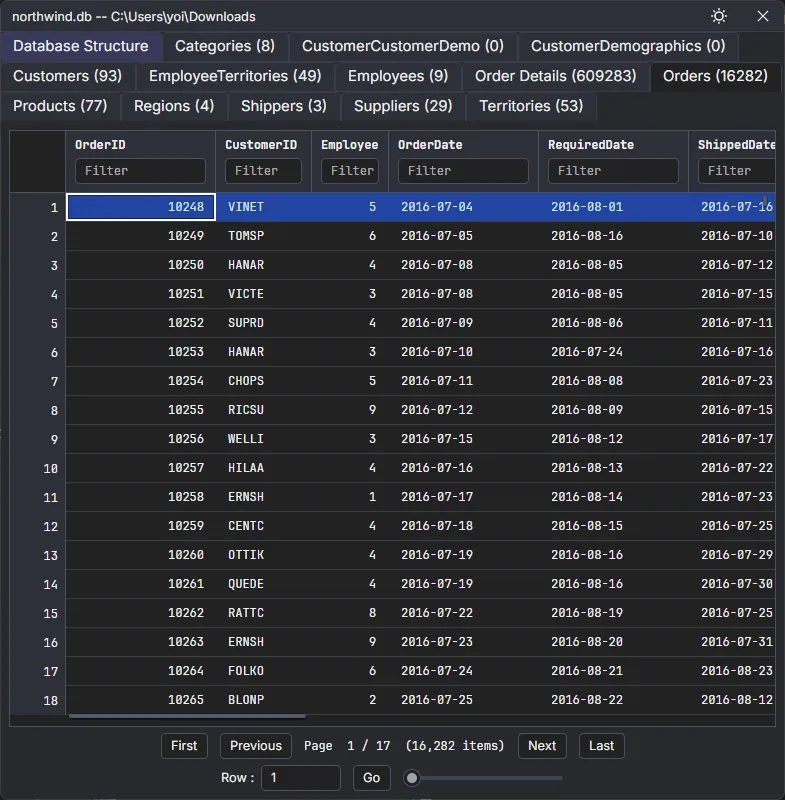
We now support viewing SQLite database files. You can check the contents of tables directly within Filedini without opening a dedicated tool, making development work much smoother.
Other Improvements
In addition to the above, we have fixed many bugs, optimized overall processing speed, and made fine-tuned improvements to the UI/UX. You should find file operations more comfortable than ever before.
Filedini will continue to evolve as a powerful tool that supports your workflow, shaped by your feedback. Please feel free to send us your thoughts and requests.
Thank you for your continued support of Filedini.
日本語訳:
Filedini v0.5 登場!ユーザーの声を反映したスクリプト機能とDDS対応強化
いつもFilediniをご利用いただき、ありがとうございます。 本日、0.5系の最初のバージョンとなる「v0.5.575」をリリースいたしました。
0.4系の最終リリースから約1ヶ月、開発チームでは 「ユーザーの皆様からのリクエスト」 を中心に据え、改めて「Filediniはどうあるべきか」という根本的なテーマと深く向き合ってまいりました。
今回のアップデートは、皆様からのフィードバックを色濃く反映したものとなっています。新機能の追加に加え、パフォーマンスの大幅な改善を行いました。主な変更点は以下の通りです。
🚀 新機能:スクリプト機能の実装
新たな試みとして、スクリプト機能を実装しました。 これにより、ユーザーご自身でFilediniの動作を拡張・自動化することが可能になります。
まずは同梱のサンプルを通して、その利便性や可能性を体験していただければ幸いです。 スクリプトAPIについては、今後継続的に機能を拡充していく予定です。「こんなAPIが欲しい」「こういう操作を自動化したい」といったご要望がございましたら、ぜひお寄せください。
🖼 画像プレビュー機能の強化
画像閲覧時のパフォーマンスと互換性を徹底的に見直しました。
1. メモリ効率の改善
対応するすべての画像形式において、デコード時のメモリ消費量を従来比で平均 1/2 ~ 1/3 にまで削減しました。これにより、大量の画像や高解像度のファイルを扱う際も、より安定した動作を実現しています。
2. DDSフォーマットの互換性と速度向上
ゲーム開発の現場で頻繁に使用されるDDSフォーマットについて、デコードエンジンを刷新しました。
対応形式の網羅 これまで扱えなかった形式にも対応し、現行のゲーム開発で使用される主要な形式はほぼ網羅いたしました。(もし表示できない画像がございましたら、ぜひご報告ください)
圧倒的な高速化 マルチコアCPUを効率的に活用するよう処理を一新しました。現世代で主流のサイズの大きなBC6H、BC7形式のデコードにおいて、最大17倍の高速化を確認しています。
キューブマップのクロスレイアウト表示 キューブマップ画像を、立方体の各面を展開したクロス(十字)レイアウトで表示するようにしました。これにより、各面の内容を一目で直感的に確認できます。
📦 アーカイブ対応形式の拡充
従来のzip形式に加え、多くのご要望をいただいていた以下の形式に対応しました。
解凍(展開)対応
以下の形式の閲覧・解凍が可能になりました。
- tar (tar, .gzip, .bz2, .lz, .xz, .zst)
- 7z
- rar
圧縮対応
zipに加え、以下の形式での圧縮に対応しました。
- tar (.gzip, .bz2, .lz)
🗃 SQLiteデータベースの閲覧
SQLite形式のデータベースファイルの閲覧に対応しました。 専用ツールを開くことなく、Filedini上で直接テーブルの内容を確認できるため、開発作業がよりスムーズになります。
その他の改善
上記に加え、多くのバグ修正、全体的な処理の高速化、そしてUI/UXの細かな改善を行っています。これまで以上に快適にファイル操作を行っていただけるはずです。
今後もFilediniは、皆様のワークフローを支える強力なツールとなるよう、ユーザーの皆様と共に進化を続けてまいります。 お気づきの点やご要望がございましたら、お気軽にお知らせください。
引き続き、Filediniをどうぞよろしくお願いいたします。