 Filedini
· 5 min read
Filedini 0.5.1177 (Beta) Released
Introducing Tabbed Interface and Command Palette.

Tabbed Interface and Command Palette
Thank you for using Filedini. We are excited to announce a major update that focuses on workflow efficiency.
In this release, we have introduced a Tab UI and a Command Palette to speed up your file management.
Here are the highlights of this release:
🚀 New Feature: Tabbed Interface
We have adopted a Tab UI to streamline your file management. Switching between multiple folders is now seamless, significantly improving efficiency when organizing or moving files.
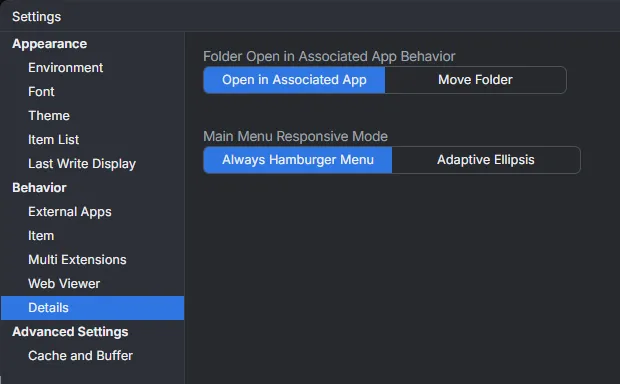
You can also customize the display of the main menu in the settings to maximize your workspace.
⌨️ New Feature: Command Palette
A powerful Command Palette has been implemented. This allows you to quickly access features that you use occasionally without needing to assign a hotkey.
It also provides instant access to your folder history, bookmarks, and launcher, allowing you to navigate entirely via the keyboard.
🌐 Native Browser Engine Support
We have switched the internal browser engine to use the OS-native components (WebView2 on Windows / WebKit on macOS).
A key benefit of this change is MP4 Playback Support. You can now play MP4 video files directly within the viewer. (Note: As a side effect of this change, the installer package size has also been reduced.)
📖 EPUB Viewer Support
We have integrated Bibi, a web-based EPUB reader. You can now open and read EPUB e-books directly within Filedini with a refined reading experience.
Other Improvements
In addition to the above, we have made various bug fixes and performance optimizations to ensure a smoother experience.
Thank you for your continued support of Filedini.
タブUIとコマンドパレットが登場!
いつもFilediniをご利用いただき、ありがとうございます。 今回のアップデートでは、ファイル操作の効率を高める新機能を追加しました。
待望の「タブUI」と「コマンドパレット」を実装しました。 主な変更点は以下の通りです。
🚀 新機能:タブUIの採用
ファイル操作の拠点を、タブ切り替え式のUIへと刷新しました。 複数のフォルダーを行き来するような作業がシームレスになり、整理や移動の作業効率が飛躍的に向上します。
また、メインメニューの表示方法は設定で調整可能ですので、お好みの作業領域を確保できます。
⌨️ 新機能:コマンドパレットの実装
キーボードだけであらゆる操作を呼び出せる「コマンドパレット」を実装しました。 ホットキーを割り当てるほどではないけれど、たまに使いたい機能などへ瞬時にアクセスできます。
また、機能の呼び出しだけでなく、フォルダー履歴やブックマーク、ランチャー機能へもこのパレットから高速にアクセスできるようになりました。これにより、キーボードから手を離さずに操作を完結させることができます。
🌐 OS標準ブラウザエンジンの利用
内部で使用するブラウザエンジンを、各OSに組み込まれているもの(WindowsのWebView2 / macOSのWebKit)を利用する方式へ変更しました。
これにより、今まで非対応だった MP4形式の動画 がビューワー内で再生できるようになりました。 (なお、この変更に伴い、インストーラーのパッケージサイズも以前より軽量化されています。)
📖 EPUB表示機能の追加
Bibi を採用し、EPUB形式のファイルの表示に対応しました。 洗練されたリーダーUIで、電子書籍をアプリ内で直接閲覧することができます。
その他の改善
上記に加え、細かなバグ修正やパフォーマンスの最適化を行っています。
より使いやすくなったFilediniをぜひお試しください。 引き続き、どうぞよろしくお願いいたします。