 Filedini
· 4 min read
Filedini 0.5.1682 (Beta) Released
Introducing anonymous usage statistics and a direct feedback channel.

Improve Filedini Together: Usage Statistics and Feedback
Thank you for using Filedini. To help us shape Filedini into an even better tool, we are introducing a mechanism to understand how the application is used in this update.
We have prioritized transparency and privacy above all else. Here are the details regarding the new features:
📊 Anonymous Usage Statistics
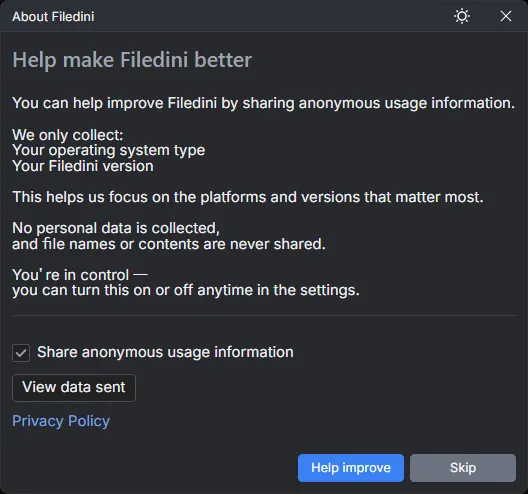
We have added a system to send anonymous usage data. This helps us understand which environments and versions are being used, allowing us to prioritize future improvements and support effectively.
What is sent (Only these 2 items):
- ✅ OS Type (Windows / macOS)
- ✅ Filedini Version
What is NOT sent:
- ✖ Personal Data (Filenames, file paths, file contents, etc. are strictly excluded.)
Starting with this version, a confirmation dialog will appear upon the first launch. Your cooperation is entirely voluntary. You can access and change this setting at any time from Help in the Main Menu.
💬 Anonymous Feedback
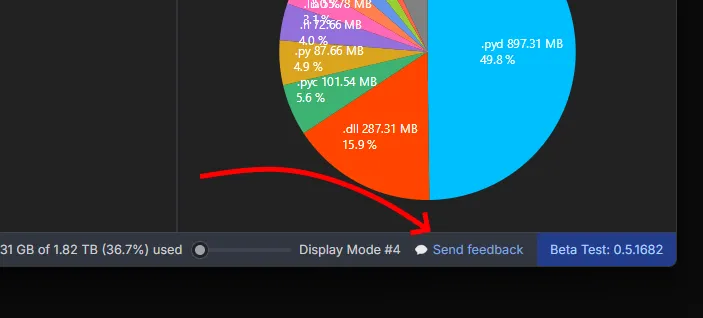
You can now send messages to the development team directly from the app, completely anonymously. Please feel free to send us your impressions, feature requests, or bug reports. Your feedback is invaluable for our future development.
You can send anonymous messages from the status bar.
Other Improvements
In addition to the above, we have made various bug fixes and performance optimizations to ensure a smoother experience.
Thank you for your continued support of Filedini.
今後の改善に向けた取り組み:利用状況の送信とメッセージ機能
いつもFilediniをご利用いただき、ありがとうございます。 Filediniをより使いやすいツールへと育てていくために、今回のアップデートでは利用状況を把握する仕組みを導入いたしました。
ユーザーの皆様に安心してご利用いただけるよう、透明性を最優先に設計しています。 詳細は以下の通りです。
📊 利用状況の送信について
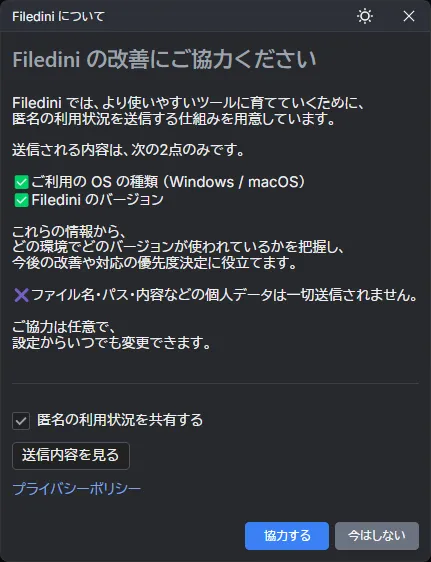
Filediniの改善や対応の優先度決定に役立てるため、匿名の利用状況を送信する仕組みを用意しました。 これにより、どの環境でどのバージョンが使われているかを開発チームが把握できるようになります。
送信される内容は、次の2点のみです:
- ✅ ご利用のOSの種類 (Windows / macOS)
- ✅ Filediniのバージョン
送信されないもの:
- ✖ 個人データ (ファイル名・パス・ファイルの内容などは一切送信されません)
本バージョンより、初回起動時に確認ダイアログが表示されます。 ご協力は任意です。設定は、メインメニューの ヘルプ からいつでも変更することができます。
💬 開発チームへのメッセージ送信
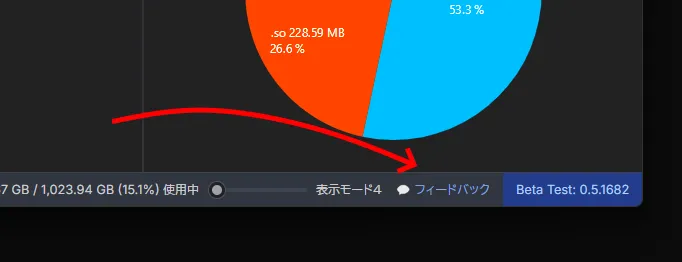
匿名で、開発チームに直接メッセージを送ることができるようになりました。 使ってみた感想や、「こんな機能が欲しい」といったご要望など、気軽にお送りいただけると今後の開発の励みになります。
匿名メッセージの送信は、ステータスバーから行えます。
その他の改善
上記に加え、細かなバグ修正やパフォーマンスの最適化を行っています。
引き続き、皆様と共にFilediniをより良いものにしていければと考えています。 どうぞよろしくお願いいたします。