 Filedini
· 5 min read
Filedini 0.5.786 (Beta) Released
In today's update, we have added a new "Web Viewer" feature that significantly expands your file viewing capabilities.

Introducing the Web Viewer: Seamlessly Preview Markdown, PDFs, and Videos
Thank you for using Filedini. In today’s update, we have added a new “Web Viewer” feature that significantly expands your file viewing capabilities.
We have also improved overall performance and enhanced the UI/UX. Here are the highlights of this release:
🚀 New Feature: Web Viewer Integration
We have implemented a new viewer based on web technologies. This allows you to comfortably view the following files directly within Filedini:
- Local HTML Files Quickly check HTML files without opening a web browser.
- Internet Shortcuts Preview the destination of
.urlfiles and other links directly within the app. - Dedicated Markdown Preview View Markdown documents in a clean, formatted layout.
⚙️ Customizing File Viewing with the Web Viewer
You can now specify which file extensions should open in the Web Viewer via user settings. This enables you to display or play specific file formats using a browser-like rendering engine.
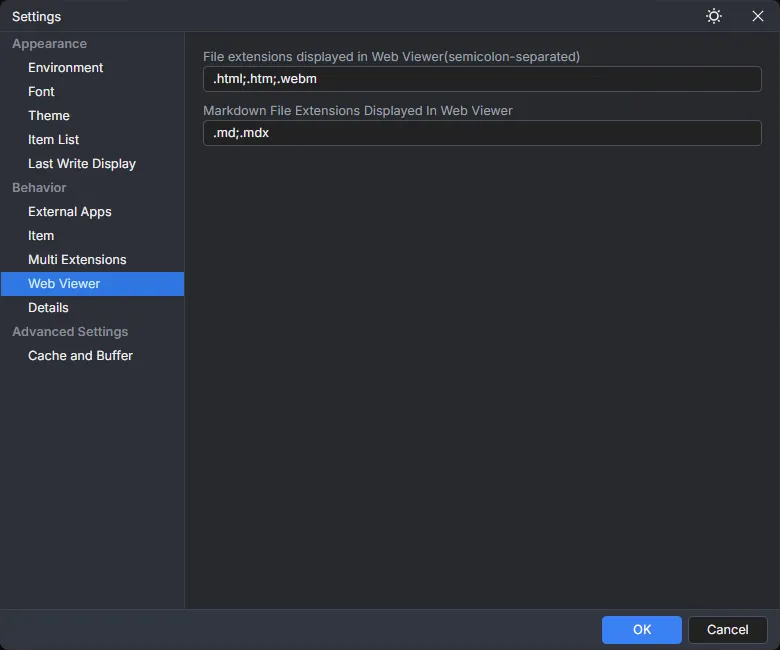
Use Case 1: Video Player
By associating video files with the Web Viewer, you can check video content solely within Filedini. (Please note: Some video formats may not play due to licensing or codec limitations.)
Use Case 2: Advanced PDF Viewer
If you set PDF files to open in the Web Viewer, you can view and navigate PDFs using a Chrome-like UI. You can choose between this and the traditional display method according to your preference.
Other Improvements
In addition to the above, we have made the following fixes and improvements:
- Bug fixes
- Overall processing speed optimization
- Fine-tuned UI/UX enhancements
With the implementation of the Web Viewer, the need to switch between external apps is reduced, allowing for smoother file management. We invite you to customize it to fit your own workflow.
Thank you for your continued support of Filedini.
Webビューワー機能を搭載!Markdown、PDF、動画閲覧がよりシームレスに
いつもFilediniをご利用いただき、ありがとうございます。 本日のアップデートでは、ファイル閲覧の幅を大きく広げる「Webビューワー機能」を新規追加いたしました。
その他、パフォーマンスの向上やUI/UXの改善も行っています。 主な変更点は以下の通りです。
🚀 新機能:Webビューワーの搭載
新たにWeb技術ベースのビューワーを実装しました。これにより、以下のファイルがFiledini内で快適に閲覧できるようになります。
- ローカルHTMLファイルの表示 ブラウザを開くことなく、手元のHTMLファイルを素早く確認できます。
- インターネットショートカットの表示
.urlファイルなどのリンク先を、アプリ内で直接プレビューできます。 - Markdownファイルの専用プレビュー Markdown形式のドキュメントを、整形された見やすい状態で表示します。
⚙️ Webビューワーによるファイル閲覧のカスタマイズ
Webビューワーで開く拡張子をユーザー設定で指定できるようになりました。 これにより、特定のファイル形式をブラウザ同様のレンダリングエンジンで表示・再生することが可能です。
活用例1:動画プレイヤーとして
動画ファイルをWebビューワーに関連付けることで、Filedini単体で動画の内容を確認できるようになります。 (※一部の動画形式については、ライセンスやコーデックの関係上、再生できない場合がございます。あらかじめご了承ください。)
活用例2:高機能なPDF閲覧
PDFファイルをWebビューワーで開くよう設定すれば、Chrome譲りの使いやすいUIでPDFを閲覧・操作することが可能になります。 従来の表示方法とお好みに合わせて選択してください。
その他の改善
上記に加え、以下の修正・改善を行っています。
- バグの修正
- 全体的な処理の高速化
- UI/UXの細かなブラッシュアップ
今回のWebビューワー実装により、外部アプリを行き来する手間が減り、よりスムーズにファイル管理が行えるようになりました。 ぜひ、ご自身のワークフローに合わせてカスタマイズしてみてください。
引き続き、Filediniをどうぞよろしくお願いいたします。